TRUCK SIM APPS & MODS

Euro Truck Simulator 2 · American Truck Simulator

Free apps and mods
for the long haul

A GPS with lane guidance that runs beside the game, a digital instrument cluster, a driver-hours tachograph, a mod manager, and a handful of truck mods. All free, no account, no ads.

APPS Companion apps

The GPS, the cluster and the tachograph read live data from the game through the free TruckSim GPS Telemetry Server, which must be running while you play (see Getting started). They never change the game.

ETS2-ATS GPS

ETS2ATSWindows 1.12.1Android 1.14.1iPad / browser

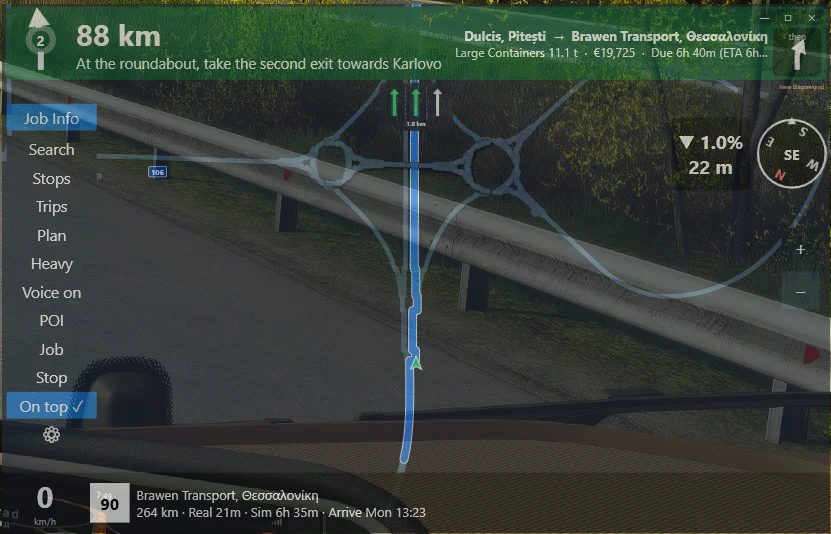
The GPS window over the game, with the turn banner, lane arrows and route

Turn-by-turn navigation built from your own game install and map mods, with spoken directions and lane guidance. Put it on a second screen, see-through over the game, or on a tablet beside you.

  • Routes to your job, to the pickup of a Freight Market job, or anywhere on the map
  • Lane guidance, roundabout exits, flyovers in 3D, road shields and speed limits
  • Nearest fuel, rest area, service, weigh station, dealer or ferry
  • Voice control in Windows: "GPS, take the job", "minimize", "how far"
  • Trip planner, saved trips, Heavy / Fast / Tour routing
  • Metric or imperial units in either game

The Windows setup also installs the lane overlay: a small always-on-top lane panel for over the game. iPad, iPhone and any browser use the web version served by the Windows app. All Windows releases · All Android releases
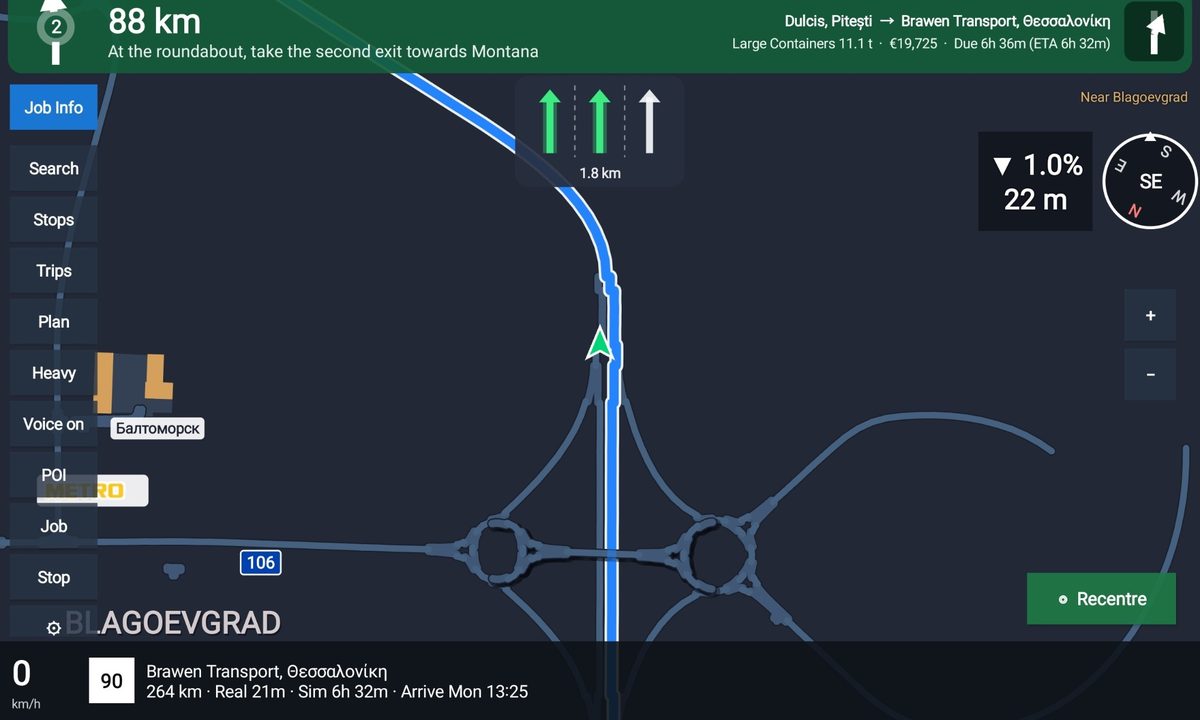
The Android app on a tablet, with lane arrows and a roundabout ahead
The Android app on a tablet

ETS2-ATS Instrument Cluster

ETS2ATSWindows 1.5.0Android 1.5.0

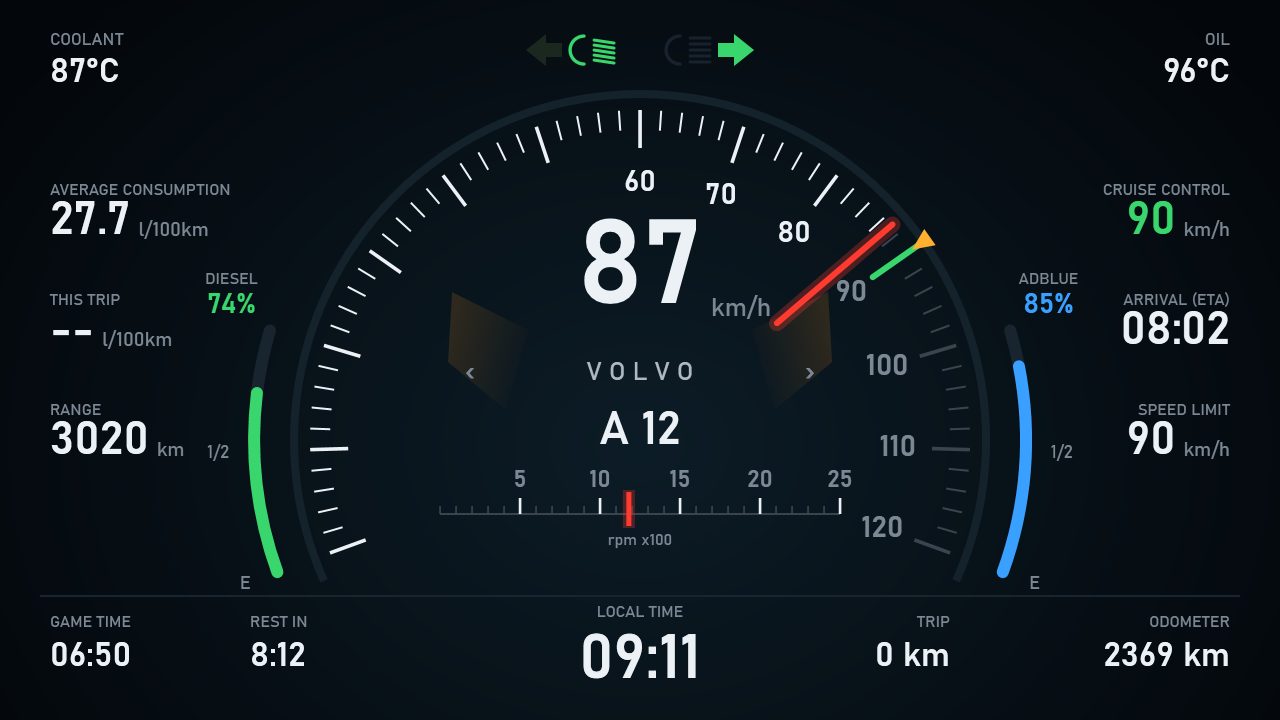
The digital instrument cluster with speed, rev counter, fuel, AdBlue and trip data

A digital dashboard in its own window: put it on a second monitor, under the game, or on an old tablet mounted by your desk.

  • Speed, revs, gear, cruise control and the speed limit
  • Fuel and AdBlue / DEF with warnings, range and consumption
  • Temperatures, trip, odometer, ETA, rest timer and both clocks
  • Metric or imperial, any size from small to full screen
  • Minimize and restore by voice through the GPS app

All releases

ETS2 Tachograph

ETS2Windows 1.5.0

A digital tachograph that tracks your driving time against the EU driver-hours rules, warns you before you need to stop, and shows it on a dark, DTCO-style instrument. A game aid, not a certified tachograph.

  • 4h30 driving then a 45-minute break (or 15 + 30), 9h / 10h daily driving, weekly and fortnightly limits
  • Daily and weekly rest, reduced and split rest, compensation owed
  • Driving, work and rest detected automatically; ferries and trains count as rest
  • Spoken warnings at 30, 15, 5 and 0 minutes
  • 28-day history with a 24-hour chart and CSV export; global hotkeys

All releases

Truck Mod Manager

ETS2ATSWindows 1.0.1

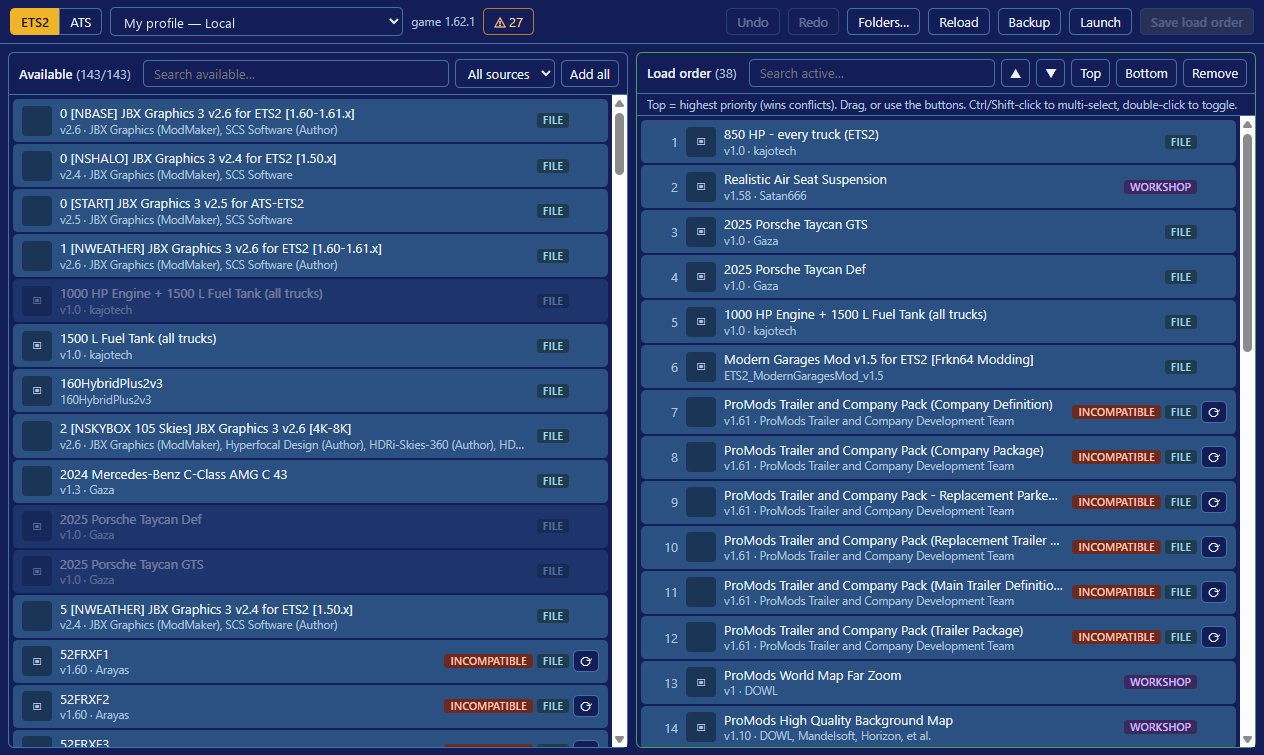
Truck Mod Manager with installed mods on the left and the profile's load order on the right

Every mod you have installed next to your profile's load order, so you can sort, add and remove mods faster than in the game's own Mod Manager. Close the game, make your changes, save, then start the game.

  • ETS2 and ATS, local and Steam Cloud profiles
  • Drag to reorder, Top / Bottom, multi-select, undo and redo
  • Flags mods made for an older game version and helps find updates
  • Mod folder, Steam Workshop and extra folders in one list
  • Backs up your profile before every save; launches the game

It doesn't need the telemetry server. It changes only the active-mod list in your profile, after making a backup. All releases

MODS Truck mods

Made for game version 1.62. Download the .scs file, put it in your game's mod folder, then switch it on in the game's Mod Manager (see Getting started).

ATS American Truck Simulator

850 HP – every truck

Every stock engine of every truck gives 850 hp, so whatever you drive has it: your own trucks, quick-job trucks and new purchases. Sounds, rev ranges and badges stay as they are.

Download · 117 KB

1000 HP engine + 400 gal tank

Adds a “1000 HP” engine to every truck (buy it under Engine at any service or dealer), cloned from each truck's strongest stock engine. Every diesel tank holds 400 gal.

Download · 249 KB

1500 L (396 gal) fuel tank

Every diesel truck's tank holds 1500 litres. Works on trucks you already own; nothing to buy.

Download · 237 KB

Peterbilt 579 sound – all stock trucks

Every stock truck uses the game's own Peterbilt 579 engine sound. Sound only; contains no copied audio. Place it above other engine and sound mods.

Download · 305 KB

Peterbilt 389 sound – all stock trucks

The same for the classic Peterbilt 389 engine sound. Use one of the two sound mods, not both.

Download · 580 KB

ProMods Canada BC fix for Alaska NTTF

With Alaska – North to the Future and ProMods Canada together, British Columbia's towns lose their province. This patch fixes it. Place it above ProMods Canada.

Download · 1 KB

ETS2 Euro Truck Simulator 2

850 HP – every truck

Every stock engine of every truck, electric ones included, gives 850 hp. Sounds, rev ranges and badges stay as they are.

Download · 106 KB

1000 HP engine + 1500 L tank

Adds a “1000 HP” engine to every truck (buy it under Engine at any service or dealer), cloned from each truck's strongest stock engine. Every diesel tank holds 1500 litres.

Download · 131 KB

1500 L fuel tank

Every diesel truck's tank holds 1500 litres. Works on trucks you already own; nothing to buy.

Download · 118 KB

START Getting started

1

Telemetry server (for the apps)

Install the free TruckSim GPS Telemetry Server on the PC that runs the game, and start it before you play. The apps read the truck's data from it (port 31377).

2

Install an app

Run the Windows setup: it installs for your user only, no administrator rights. On Android, open the downloaded .apk and allow installs from your browser when asked. Each app checks for updates itself.

3

Install a mod

Copy the .scs file to Documents\American Truck Simulator\mod or Documents\Euro Truck Simulator 2\mod. In the game open Mod Manager, switch the mod on and confirm.

The apps and installers are not code-signed, so Windows SmartScreen, Android or an antivirus may warn the first time you run them. Each release page lists SHA-256 checksums you can compare.

SUPPORT Buy me a coffee

Everything here is free and stays free. If an app or mod has made your hauls better and you'd like to say thanks, a coffee keeps the updates coming.

Buy me a coffee